
If you are looking for simple tech problem solutions, you’re in the right place. Technology is part of our daily life now—phones, laptops, Wi-Fi, apps, and smart devices. But let’s be honest: when something stops working, it can feel stressful and confusing.
The good thing is that most issues don’t need expert repair. With a few clear steps and a little patience, you can fix many problems yourself. In this guide, I’ll explain simple tech problem solutions in a detailed, easy, and conversational way so you can understand and apply them without any technical background.
1. Slow Phone or Computer – Why It Happens & How to Fix It

A slow device is one of the most common problems people face. Before thinking your phone or laptop is “broken,” try these simple tech problem solutions.
Why it happens:
- Too many apps running at once
- Low storage space
- Outdated software
- Background processes consuming memory
Easy solutions:
- Restart your device regularly
- Close apps you are not using
- Delete unnecessary files, videos, and apps
- Clear cache from apps and browser
- Update your operating system
Extra tip: If your phone is still slow, try uninstalling heavy apps you rarely use. It can instantly improve performance.
2. Wi-Fi Not Working or Slow Internet
Internet issues are frustrating, especially when you need it urgently. But don’t worry—these simple tech problem solutions usually fix the issue quickly.
Common causes:
- Router glitches
- Weak signal strength
- Too many connected devices
- Internet service issues
Step-by-step fixes:
- Restart your Wi-Fi router (turn it off for 30 seconds, then on again)
- Move closer to the router
- Disconnect unused devices from Wi-Fi
- Forget the network and reconnect again
- Check if your data plan or internet service is active
If nothing works, try resetting your router once. It often solves hidden connection problems.
3. Apps Crashing or Not Opening
When apps crash suddenly, it feels annoying—but it’s usually an easy fix.
Why apps crash:
- Bugs in the app
- Outdated version
- Corrupted cache files
- Low storage or RAM
Simple tech problem solutions:
- Update the app from Play Store or App Store
- Clear app cache and data
- Restart your device
- Reinstall the app if needed
Most apps behave better after a simple update or reinstall.
4. Laptop Freezing or Hanging Issues
A frozen laptop can stop your work instantly, but don’t panic.
Possible reasons:
- Too many heavy programs running
- Insufficient RAM
- Virus or malware
- Overheating
Fix it easily:
- Press Ctrl + Alt + Delete and open Task Manager
- End unnecessary tasks
- Restart the laptop
- Run antivirus scan
- Make sure vents are clean for proper cooling
Keeping your laptop clean (inside and out) helps prevent freezing issues.
5. Battery Draining Too Fast
Battery issues are very common, especially on smartphones. Luckily, you can fix them easily with these simple tech problem solutions.
Why battery drains fast:
- Bright screen
- Background apps running
- GPS and Bluetooth always on
- Old battery health
What you can do:
- Lower screen brightness
- Turn off location when not needed
- Close background apps
- Enable battery saver mode
- Disable unnecessary notifications
If your phone is old, battery replacement may also help.
6. Bluetooth or Headphones Not Connecting
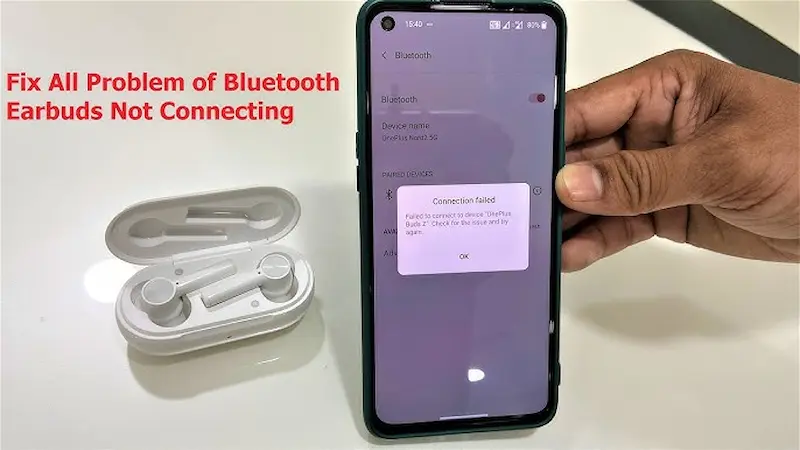
Bluetooth issues usually happen due to small glitches.
Try these fixes:
- Turn Bluetooth off and on again
- Restart both devices
- Remove old paired devices
- Keep devices close together
- Forget device and pair again
These simple tech problem solutions solve most connection problems in seconds.
7. Storage Full Warning Problem
When your device shows “storage full,” performance usually drops too.
Why it happens:
- Too many photos/videos
- Large apps installed
- Download folder overload
Easy solutions:
- Delete unused files and apps
- Move photos to cloud storage or SD card
- Clear WhatsApp media and downloads
- Empty trash or recycle bin
A clean device always works faster and smoother.
You may also like to read this:
Top Gadgets Reviews For Students Best Study Tech
Which Gadget Is Best To Buy in 2026 Complete Guide
Easy Tech Guides For Beginners To Learn Technology Easily
How To Use New Technology | Simple Beginner Guide
Step By Step Tech Tutorials For Beginners 2026
8. Overheating Devices
Overheating can damage your device if ignored.
Causes:
- Heavy gaming or apps
- Charging while using device
- Poor ventilation
Fix it:
- Close heavy apps
- Avoid using device while charging
- Remove phone case during charging
- Keep device in cool environment
9. Software Update Problems
Sometimes updates fail or cause issues.
What to do:
- Ensure enough storage before updating
- Use stable Wi-Fi connection
- Restart device and try again
- Install updates one by one
Updates are important—they fix bugs and improve performance.
Final Thoughts
Technology issues are a normal part of using devices, but they don’t always require expert help. Most problems can be solved using these simple tech problem solutions with just a few steps.
The key is to stay calm, try basic fixes first, and avoid unnecessary stress. Once you understand these simple methods, you’ll feel more confident handling everyday tech issues on your own.
FAQs
1. What are simple tech problem solutions?
They are easy troubleshooting steps that help fix common device issues without needing professional help.
2. Do I need technical skills to fix tech problems?
No, most simple tech problem solutions are beginner-friendly and easy to follow.
3. Why do devices slow down over time?
Mostly due to storage overload, outdated software, and background apps.
4. How often should I restart my device?
Restarting once or twice a week helps keep your device running smoothly.
5. What is the easiest fix for most tech problems?
Restarting your device is often the quickest and most effective solution.