
If you are searching for apps to improve productivity, you’re likely trying to take control of your time, reduce distractions, and get more meaningful work done without feeling overwhelmed. The truth is, productivity is not just about working harder—it’s about working smarter, and the right apps can completely change how you plan, focus, and execute your daily tasks. Instead of relying on memory or scattered notes, these tools help you build a structured system that keeps everything organized and easy to manage.
Let’s go deeper and explore how different types of productivity apps actually work in real life and how you can use them in a practical way.
Apps to Improve Productivity – Complete Detailed Guide
1. Task Management Apps: Your Daily Control Center
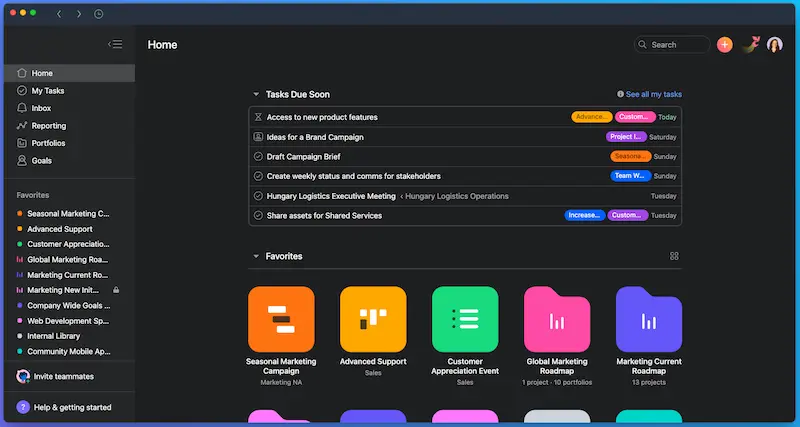
Task management apps are the foundation of productivity. If your work or studies feel messy, this is where you start.
These apps allow you to:
- Break big tasks into smaller steps
- Set priorities (what matters most today)
- Assign deadlines
- Track what you’ve completed
How it helps in real life
Imagine you wake up and instead of thinking “What should I do today?”, you already have a clear list waiting for you. That alone reduces mental stress and decision fatigue.
Practical example
Let’s say you are a student:
- “Complete math homework”
- “Revise biology chapter 3”
- “Prepare notes for English essay”
Instead of keeping all this in your mind, you simply open your task app and follow the list step by step.
Why it boosts productivity
When your tasks are clearly written and organized, your brain stops wasting energy remembering things and focuses only on doing them.
2. Note-Taking Apps: Capture Everything Instantly
Ideas come at the worst possible time—while walking, studying, or even before sleep. Note-taking apps solve this problem.
You can use them to:
- Save ideas instantly
- Write down important information
- Store study material
- Organize meeting notes or thoughts
Real-life benefit
Instead of forgetting important ideas, you build a digital memory system.
Example use case
- A business idea comes to your mind → write it immediately
- Teacher explains something important → note it quickly
- You find useful information online → save it for later
Productivity advantage
You stop losing ideas and reduce the time spent searching for scattered information.
3. Calendar Apps: Master Your Time
Time management is one of the most important parts of productivity, and calendar apps help you take full control of it.
They allow you to:
- Schedule your day or week
- Set reminders for important tasks
- Plan study or work sessions
- Avoid missing deadlines
Why it matters
Without a schedule, your day controls you. With a calendar, you control your day.
Simple example
Instead of thinking:
“I will study later…”
You plan:
- 4:00 PM – Study English
- 5:00 PM – Break
- 5:30 PM – Practice math
Result
Your day becomes structured instead of random.
4. Focus Apps: Remove Distractions
Distractions are one of the biggest reasons people struggle with productivity. Social media, notifications, and multitasking can destroy focus.
Focus apps help you:
- Block distracting apps or websites
- Set focused work timers
- Build concentration habits
- Track your focused hours
How they work in practice
You set a timer for 25–50 minutes and focus only on one task. After that, you take a short break.
Why this is powerful
Your brain performs better in short, focused sessions instead of long, unfocused hours.
Real-life effect
Instead of studying for 3 hours with distractions, you might study effectively in 1.5 focused hours.
5. Cloud Storage Apps: Never Lose Your Work

Losing files or not finding documents is frustrating and time-wasting.
Cloud storage apps help you:
- Store files safely online
- Access them from any device
- Share documents easily
- Keep backups of important work
Real-world benefit
Whether you are at home, school, or traveling, your files are always available.
Example
You write an assignment on your phone, open it later on your laptop, and continue editing without transferring anything manually.
6. Communication Apps: Work Faster with Others
If you are working in a team, communication speed directly affects productivity.
These apps help you:
- Send instant messages
- Share files and updates
- Collaborate on group projects
- Reduce long waiting times for replies
Why they matter
Instead of waiting for emails or physical meetings, everything happens instantly.
Example
A group project becomes easier when everyone can:
- Discuss ideas in real time
- Share files instantly
- Assign tasks quickly
7. Automation Apps: Save Time Automatically
Automation is one of the most powerful productivity upgrades.
These apps help you:
- Connect different apps together
- Automate repetitive tasks
- Reduce manual work
- Save hours every week
Simple example
Instead of manually saving every file or sending repeated reminders, automation apps can handle it for you automatically.
Why this is important
You spend less time on repetitive tasks and more time on important work.
You may also like to read this:
Best Apps For Daily Use To Boost Productivity Fast
Useful App Tools For Students To Boost Study Productivity
Top Productivity Apps List For Students and Professionals
Free Apps For Beginners 2026: Easy Tools For Daily Use
Best Software Tools For Work To Improve Productivity in 2026
How to Build a Smart Productivity System
You don’t need 20 different apps. The key is simplicity and consistency.
A strong setup looks like this:
Basic productivity stack:
- Task app → for planning work
- Note app → for ideas and learning
- Calendar app → for time management
- Focus app → for concentration
That’s enough to build a powerful productivity system.
Common Mistakes People Make
Many people install productivity apps but still don’t become productive. Why?
Because they:
- Use too many apps at once
- Don’t stick to a system
- Keep changing tools
- Don’t follow schedules
Solution
Pick simple tools and use them daily instead of switching constantly.
Final Thoughts
Using apps to improve productivity is not about filling your phone with tools—it’s about building a system that helps you think clearly, manage time better, and stay focused on what truly matters.
If you use even a few of these apps consistently, you will notice a big difference in how organized and productive your day becomes.
The goal is not perfection—it’s progress, and the right apps simply make that progress easier and more consistent.
FAQs – Apps to Improve Productivity
1. What are apps to improve productivity used for?
Apps to improve productivity are designed to help you manage your time, organize tasks, stay focused, and complete work more efficiently. They reduce confusion and help you follow a clear daily plan.
2. Do productivity apps actually increase efficiency?
Yes, they can significantly improve efficiency if used properly. These apps don’t do the work for you, but they help you stay organized, avoid distractions, and manage your tasks in a structured way.
3. Which types of productivity apps are most important?
The most important types include:
Task management apps for planning work
Note-taking apps for ideas and information
Calendar apps for scheduling
Focus apps for reducing distractions
Using a combination of these gives the best results.
4. Can students benefit from productivity apps?
Yes, students benefit a lot from productivity apps. They can use them to manage study schedules, organize assignments, take notes, and prepare for exams in a more structured way.
5. Are free productivity apps good enough?
Most free productivity apps are powerful enough for daily use. Paid versions usually offer advanced features, but beginners can easily start with free tools and still stay productive.