
If you are just starting your journey with smartphones, computers, or digital tools, then choosing the right free apps for beginners can make a huge difference. These apps are designed to be simple, easy to understand, and helpful for everyday tasks like learning, organizing, communicating, and creating content.
You don’t need advanced skills or technical knowledge. You just need the right apps and a little practice. Let’s go through everything in a clear and practical way.
Why Beginners Should Start With Simple Apps
When you are new to technology, complicated apps can feel confusing and frustrating. That’s why beginners should always start with easy and user-friendly tools.
Simple apps help you:
- Understand basic features quickly
- Avoid confusion and frustration
- Build confidence step by step
- Learn without pressure
- Stay consistent in using technology
Starting simple is always the smartest approach.
Best Free Apps for Beginners (Explained in Detail)
Now let’s look at some of the most useful free apps for beginners and understand how they actually help in real life.
Canva – Easy Design for Everyone
Canva is one of the most beginner-friendly design apps available today. It allows you to create professional-looking designs without any experience.
What you can do with Canva:
- Design social media posts
- Create resumes
- Make posters and flyers
- Build presentations for school or work
Why it is great for beginners:
You don’t need any graphic design knowledge. Everything works with simple drag-and-drop tools. You can pick a template, edit text, change images, and your design is ready in minutes.
Even someone using it for the first time can create something good without difficulty.
Duolingo – Learn Languages Step by Step
Duolingo is a popular language learning app that makes learning simple and fun.
Key features:
- Short daily lessons
- Easy vocabulary exercises
- Listening and speaking practice
- Progress tracking
Why beginners like it:
Instead of long grammar lessons, Duolingo teaches through small exercises. It feels more like a game than studying.
This makes it perfect for beginners who want to learn English or any other language without stress.
Google Keep – Simple Note Taking App
Google Keep is a lightweight and very easy note-taking app.
What you can do:
- Write quick notes
- Create to-do lists
- Save ideas instantly
- Set reminders for important tasks
Why it is useful:
There are no complicated menus or settings. You open the app and start typing. It is perfect for beginners who just want a simple way to stay organized.
Trello – Organize Tasks Visually
Trello is a task management app that helps you stay organized in a visual way.
How it works:
You create boards for different areas of your life such as study, work, or personal tasks. Then you add tasks as cards and move them as you complete them.
Why beginners find it helpful:
It is very visual and easy to understand. You can see your progress clearly without needing advanced planning skills.
Spotify – Music and Podcasts in One Place
Spotify is widely used for music, but it also offers educational podcasts.
Features:
- Millions of songs
- Free playlists
- Podcasts on learning and motivation
- Easy search and play system
Beginner advantage:
You don’t need to download or manage files. Everything is available in one place, ready to use anytime.
Google Maps – Easy Navigation Tool
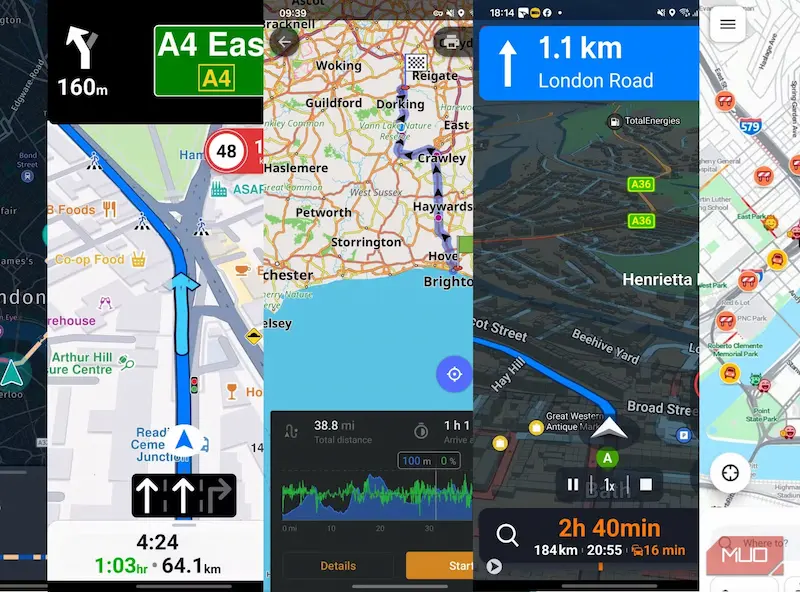
Google Maps is one of the most essential apps for daily life.
What it offers:
- Step-by-step navigation
- Real-time traffic updates
- Nearby places like shops and restaurants
- Route suggestions
Why beginners need it:
Even if you are in a new place, Google Maps guides you clearly. You just enter a location and follow instructions.
Zoom – Simple Video Communication
Zoom is a popular app for online meetings and classes.
Features:
- Video calls
- Group meetings
- Screen sharing
- Easy joining through links
Why it is beginner-friendly:
You don’t need complicated setup. Just click a link and join the meeting instantly.
Grammarly Keyboard – Improve Your Writing
Grammarly helps you write better English by correcting mistakes.
What it does:
- Fixes spelling errors
- Improves grammar
- Suggests better sentence structure
- Helps you learn while writing
Why beginners benefit:
It works in real time, so you improve your writing automatically over time.
You may also like to read this:
Beginner Guide To Technology For Beginners Step By Step
How To Fix Common Tech Issues – Easy Guide 2026
Best Apps For Daily Use To Boost Productivity Fast
Useful App Tools For Students To Boost Study Productivity
Top Productivity Apps List For Students and Professionals
How to Choose the Right App as a Beginner
Not every app is necessary for everyone. The key is to choose based on your needs.
Here is a simple guide:
- For learning languages: Duolingo
- For design work: Canva
- For organization: Google Keep or Trello
- For communication: Zoom
- For entertainment and learning: Spotify
- For navigation: Google Maps
Start with one or two apps instead of downloading everything at once.
Common Mistakes Beginners Should Avoid
When using free apps for beginners, avoid these mistakes:
- Installing too many apps at the same time
- Trying advanced features too early
- Not practicing regularly
- Getting overwhelmed by options
- Ignoring basic features and jumping ahead
Learning slowly is always more effective than rushing.
Tips to Learn Faster Using Apps
If you want to improve your skills quickly, follow these tips:
- Use apps for a few minutes daily
- Focus on one app at a time
- Explore features step by step
- Practice regularly instead of occasionally
- Watch simple tutorials if needed
Consistency matters more than speed.
Final Thoughts
The right free apps for beginners can make your digital journey much easier and more enjoyable. These tools are designed to help you learn, organize, communicate, and improve your skills without stress or confusion.
Start small, stay consistent, and don’t rush. With time, you will become comfortable using these apps and handling technology confidently in your daily life.
FAQs – Free Apps for Beginners
1. What are the best free apps for beginners?
Some of the best free apps for beginners include Canva for design, Duolingo for learning languages, Google Keep for notes, Trello for task management, Spotify for music and learning podcasts, Google Maps for navigation, Zoom for online meetings, and Grammarly for improving writing.
2. Are free apps for beginners really useful?
Yes, they are very useful. These apps are designed to be simple and easy to use. They help beginners learn new skills, stay organized, communicate better, and improve productivity without any cost.
3. Do I need technical skills to use these apps?
No, you do not need any technical skills. Most free apps for beginners are built with user-friendly interfaces, so anyone can use them easily even without prior experience.
4. Can I use these apps on both mobile and computer?
Yes, many beginner-friendly apps like Canva, Trello, Google Keep, and Spotify work on both mobile phones and computers. Some apps are also available as web versions for easy access.
5. Which app is best for learning something new?
Duolingo is one of the best apps for learning new languages. If you want to improve creativity, Canva is also a great option. For general learning and organization, Google Keep and Trello are very helpful.